Presenter bubble styles and shapes explained
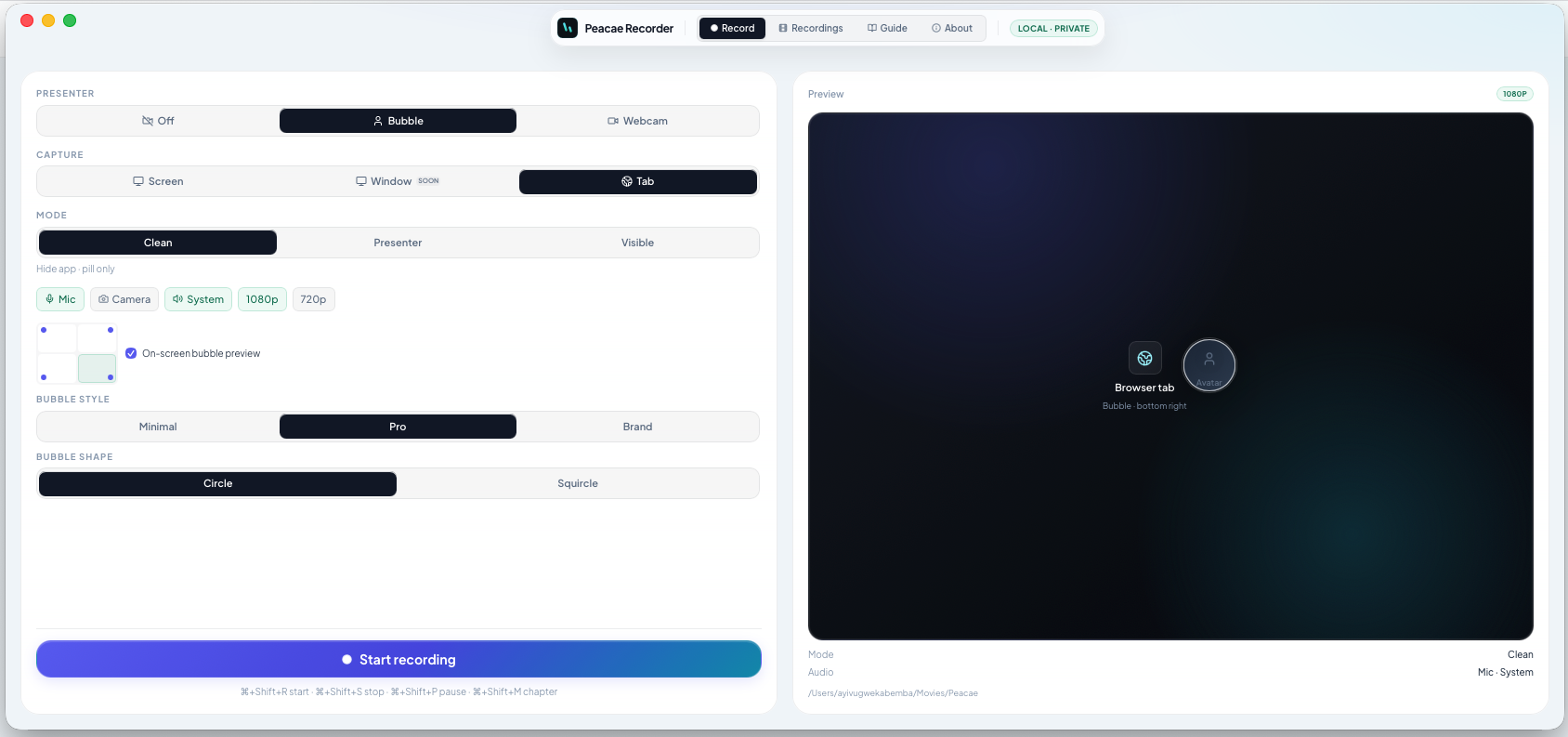
A presenter bubble keeps you on screen without taking over the full frame. In OhRec you can pick the corner, preview it live, and match the exported look before you press record.
Position and preview
Use the corner grid to place the bubble where it will not cover important UI. On desktop, enable on-screen bubble preview in Presenter or Visible mode so you see the overlay while you set up.
Style: Minimal, Pro, Brand
Minimal is a clean circle with a light border. Pro adds depth and contrast for product demos. Brand uses your accent palette for a polished walkthrough. The live preview reflects the exported frame.
Shape: Circle or Squircle
Circle is classic and compact. Squircle softens the edges for a modern app feel. Combine style and shape with your capture mode for the look you want in the final WebM.
Screenshots
1 screenshot — opens in a gallery dialog
Related Articles
How to record your screen privately in the browser
A quick walkthrough of the web recorder setup: sources, audio, quality, and what stays on your device.
Switch screen and camera mid-recording
Change views during a recording with a smooth transition instead of starting a new file.
Your recordings library stays on this device
Why local storage matters and how to manage recordings on web and desktop.